
 Reference range:

P100 Biomarker in Borrelia Test Panel: Understanding Its Role in Lyme Disease Diagnosis
When it comes to diagnosing Lyme disease, a condition caused by the Borrelia burgdorferi bacteria, healthcare providers often rely on a combination of clinical evaluation, patient symptoms, and specific laboratory tests. One of the components sometimes found on a Borrelia test panel is the P100 biomarker. Understanding what this biomarker signifies and how it fits into Lyme disease diagnostics can shed light on the often-complex process of diagnosing this tick-borne illness.
What is the P100 Biomarker?
P100 is a protein antigen found in the Borrelia burgdorferi bacterium. This protein, along with others like P41, OspC, and others, is used to detect the presence of an immune response to Lyme disease. The P100 antigen, sometimes referred to as the 100 kDa protein, gets its name from its molecular weight. This protein becomes relevant in Lyme disease testing because it is associated with the immune response to the infection; when the immune system encounters Borrelia burgdorferi, it generates antibodies that specifically target bacterial antigens, including P100. Detecting antibodies against P100 can provide insight into a patient’s exposure to the Lyme-causing bacteria.
The Role of P100 in Lyme Disease Diagnosis
Lyme disease testing usually follows a two-tiered approach, with an initial ELISA (enzyme-linked immunosorbent assay) screen followed by a confirmatory Western blot test if the ELISA is positive or indeterminate. The Western blot test breaks down the analysis of a patient’s immune response by examining reactivity against specific Borrelia proteins—this is where P100 can be especially valuable.
In Western blot testing, the P100 band, among other bands, is observed to determine whether specific antibodies are present. The appearance of the P100 band generally indicates an immune response against Borrelia burgdorferi. However, it’s important to note that no single protein band alone is definitive for diagnosing Lyme disease; instead, a combination of several bands, including P100, contributes to a more complete picture of whether Lyme disease is likely.
The CDC (Centers for Disease Control and Prevention) typically recommends that IgG Western blot positivity requires reactivity on at least 5 of 10 specified bands, while IgM positivity requires at least 2 of 3 bands, though the inclusion of the P100 band varies by testing standards and clinical guidelines.
Why is P100 Significant?
The P100 biomarker is often considered significant in long-term or chronic cases of Lyme disease. Studies suggest that while some of the other Borrelia proteins, like P41 (flagellin) or OspC, may be detected early in infection, P100 may not be detectable until later stages. Its presence is, therefore, more often associated with a prolonged immune response. When P100 reactivity is present, it could suggest that the patient has had an infection for an extended period, or it might reflect ongoing immune activation, even after initial infection.
Due to this potential association with late-stage or chronic infection, some practitioners view the P100 band as relevant for patients with persistent symptoms who may have missed an early Lyme diagnosis. However, more research is needed to fully understand the timing of P100 appearance and its clinical significance across different stages of Lyme disease.
Limitations and Considerations of P100 in Lyme Testing
While the detection of P100 can contribute valuable information, there are limitations to using it, and it should not be used in isolation. Lyme disease is known for its complex presentation and varied immune response, meaning that some patients with Lyme disease may not produce detectable antibodies against P100 or may not develop detectable immune responses to certain Borrelia proteins. False positives can also occur due to cross-reactivity with antibodies from other infections.
Moreover, antibody-based tests have inherent limitations because antibodies can persist even after the infection is cleared, leading to potential false-positive results in those who were infected in the past but are not currently symptomatic. P100, like other Borrelia-specific antigens, can contribute to this complexity since its detection doesn’t always correlate with active infection.
P100 and Immune System Response
From an immunological perspective, P100’s role reflects the body’s adaptive immune response, which is specific and tends to develop over time. When Borrelia burgdorferi infects the body, it initially triggers the innate immune response. If the bacteria persist, the adaptive immune system ramps up, creating specific antibodies against unique Borrelia proteins like P100. However, as Borrelia can evade immune detection through various mechanisms, such as altering its surface proteins, the immune response can be inconsistent and may vary greatly from one person to another.
For some patients, especially those with ongoing symptoms that resemble post-treatment Lyme disease syndrome (PTLDS), detecting antibodies to proteins like P100 could potentially provide evidence of an enduring immune response. Yet, the direct relationship between these antibodies and persistent symptoms is still an area of active research, with ongoing debates about how best to interpret late-stage antibody responses in clinical practice.
Interpretation of P100 in the Clinical Context
While detecting antibodies against P100 can indicate a Borrelia infection, it’s important to interpret this result within the broader clinical context. Symptoms, history of tick exposure, and timing of test results all influence the diagnostic process. In cases of chronic or late-stage Lyme disease, if P100 is reactive along with other relevant Borrelia proteins, this may support the diagnosis, but it is not definitive on its own. Other diagnostic tools, including PCR or newer methods focusing on active infection detection, may be employed to complement antibody testing and provide a clearer view of a patient’s status.
When a P100 result is positive but both Borrelia Western Blot IgG and IgM results are negative, it presents a complex diagnostic scenario. The presence of P100 could suggest that the immune system has encountered Borrelia burgdorferi, the bacteria responsible for Lyme disease, especially if the patient has a history of symptoms that align with Lyme. However, the lack of IgG and IgM reactivity, which are primary markers used to confirm active or past infection, complicates interpretation, as these antibodies generally validate a Lyme diagnosis. A positive P100 in this context might indicate a past exposure or interaction with Borrelia burgdorferi that did not lead to a conventional IgM or IgG antibody response, possibly due to variations in individual immune responses or timing of testing relative to infection.
This nuanced result typically warrants further investigation. A healthcare provider may consider additional testing methods, such as PCR for Borrelia DNA, which detects the bacteria directly rather than relying on antibody responses. PCR can be especially helpful if there's suspicion of an active infection. Repeating the Western Blot test after a few weeks could also reveal changes in antibody levels, as some individuals may develop detectable IgG or IgM antibodies over time. If symptoms are ongoing or consistent with Lyme disease, retesting or considering other Lyme-related serology tests could provide further insights. Testing for other tick-borne diseases (e.g., Babesia, Ehrlichia) may also be beneficial, as co-infections can mimic Lyme symptoms and complicate diagnosis.
In summary, a positive P100 without IgM or IgG reactivity requires a careful and thorough approach, including clinical evaluation, follow-up testing, and consideration of other possible causes. This comprehensive assessment can help determine if Lyme disease or another condition is likely contributing to the patient’s symptoms.
Conclusion
P100 is one of many important biomarkers on the Borrelia test panel, contributing to the complex diagnostic landscape of Lyme disease. It reflects the body’s immune response to Borrelia burgdorferi, particularly in cases where the infection might have persisted over time. While it can be an indicator of past or chronic infection, it’s not definitive in isolation. Instead, P100 reactivity should be interpreted with caution and in conjunction with other clinical findings and laboratory results. The continued study of biomarkers like P100 is essential in enhancing our understanding of Lyme disease, improving diagnostic accuracy, and ultimately aiding in the effective management of this challenging condition.
Lab Results Explained and Tracked

All Your Lab Results.
One Simple Dashboard.
Import, Track, and Share Your Lab Results Easily
Import, Track, and Share Your Lab Results
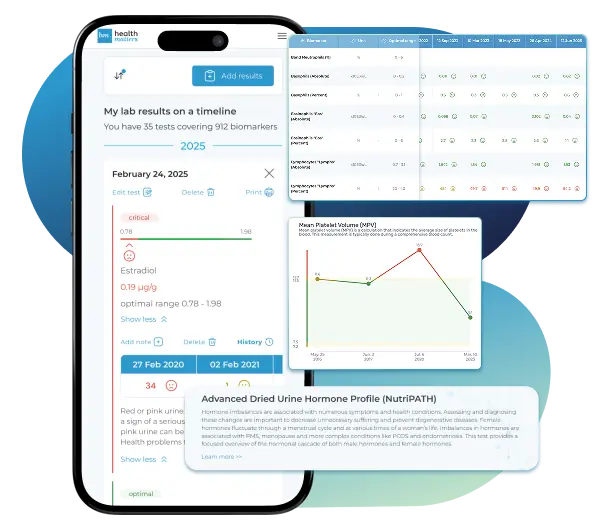
Import lab results from multiple providers, track changes over time, customize your reference ranges, and get clear explanations for each result. Everything is stored securely, exportable in one organized file, and shareable with your doctor—or anyone you choose.
Cancel or upgrade anytime
Article Review & Sources
All our content is backed by peer-reviewed studies, academic research, and trusted medical sources. We're committed to accuracy and transparency — see our editorial policy for details.
Laboratories
Bring All Your Lab Results Together — In One Place
We accept reports from any lab, so you can easily collect and organize all your health information in one secure spot.











Pricing Table
Gather Your Lab History — and Finally Make Sense of It
Finally, Your Lab Results Organized and Clear

Personal plans

$79/ year
Advanced Plan
Access your lab reports, explanations, and tracking tools.
- Import lab results from any provider
- Track all results with visual tools
- Customize your reference ranges
- Export your full lab history anytime
- Share results securely with anyone
- Receive 5 reports entered for you
- Cancel or upgrade anytime
$250/ once
Unlimited Account
Pay once, access everything—no monthly fees, no limits.
- Import lab results from any provider
- Track all results with visual tools
- Customize your reference ranges
- Export your full lab history anytime
- Share results securely with anyone
- Receive 10 reports entered for you
- No subscriptions. No extra fees.
$45/ month
Pro Monthly
Designed for professionals managing their clients' lab reports
- Import lab results from any provider
- Track lab results for multiple clients
- Customize reference ranges per client
- Export lab histories and reports
- Begin with first report entered by us
- Cancel or upgrade anytime
About membership
What's included in a Healthmatters membership
 Import Lab Results from Any Source
 See Your Health Timeline
 Understand What Your Results Mean

 Visualize Your Results

 Data Entry Service for Your Reports
 Securely Share With Anyone You Trust
Let Your Lab Results Tell the Full Story
Once your results are in one place, see the bigger picture — track trends over time, compare data side by side, export your full history, and share securely with anyone you trust.




Bring all your results together to compare, track progress, export your history, and share securely.
What Healthmatters Members Are Saying

I have been using Healthmatters.io since 2021. I travel all over the world and use different doctors and health facilities. This site has allowed me to consolidate all my various test results over 14 years in one place. And every doctor that I show this to has been impressed. Because with any health professional I talk to, I can pull up historical results in seconds. It is invaluable. Even going back to the same doctor, they usually do not have the historical results from their facility in a graph format. That has been very helpful.
Anthony
Unlimited Plan Member since 2021
What fantastic service and great, easy-to-follow layouts! I love your website; it makes it so helpful to see patterns in my health data. It's truly a pleasure to use. I only wish the NHS was as organized and quick as Healthmatters.io. You've set a new standard for health tracking!
Karin
Advanced Plan Member since 2020
As a PRO member and medical practitioner, Healthmatters.io has been an invaluable tool for tracking my clients' data. The layout is intuitive, making it easy to monitor trends and spot patterns over time. The ability to customize reports and charts helps me present information clearly to my clients, improving communication and outcomes. It's streamlined my workflow, saving me time and providing insights at a glance. Highly recommended for any practitioner looking for a comprehensive and user-friendly solution to track patient labs!
Paul
Healthmatters Pro Member since 2024

We implement proven measures to keep your data safe.
At HealthMatters, we're committed to maintaining the security and confidentiality of your personal information. We've put industry-leading security standards in place to help protect against the loss, misuse, or alteration of the information under our control. We use procedural, physical, and electronic security methods designed to prevent unauthorized people from getting access to this information. Our internal code of conduct adds additional privacy protection. All data is backed up multiple times a day and encrypted using SSL certificates. See our Privacy Policy for more details.