
 Optimal Result:
0.1 - 1 Ratio.
Optimal Result:
0.1 - 1 Ratio.

The beta-amyloid 42/40 ratio (Aβ42/40) compares two forms of amyloid-beta protein found in blood (plasma/serum) or cerebrospinal fluid (CSF): Aβ42 (a 42–amino-acid peptide) and Aβ40 (40–amino-acid peptide). In Alzheimer’s disease (AD), Aβ42 is more prone to aggregate into plaques in the brain—so its measured level decreases in fluids relative to Aβ40. A lower Aβ42/40 ratio therefore increases the likelihood of underlying amyloid plaque pathology consistent with AD biology.
Why it matters
-
Early, less-invasive insight: Blood Aβ42/40 can help identify amyloid changes earlier in the diagnostic workup and may reduce the need for PET imaging or lumbar puncture in many patients.
-
Better signal than Aβ42 alone: Normalizing Aβ42 to Aβ40 reduces person-to-person variability, improving accuracy over Aβ42 by itself.
-
Guides next steps: When combined with phospho-tau markers (e.g., p-tau217 or p-tau181), the ratio helps clinicians decide who should proceed to confirmatory testing and informs treatment discussions.
How it’s measured
Labs use immunoassays or mass spectrometry in plasma/serum or CSF. Each platform has its own reference intervals and cutoffs. Results are typically reported as a unitless ratio (Aβ42 divided by Aβ40). Because assays are not interchangeable, interpretation must follow the cutoff printed on your report.
When this test is useful
-
New or progressive memory and thinking changes under evaluation
-
Distinguishing Alzheimer’s disease from other causes of cognitive impairment
-
Triage before more invasive/expensive tests (amyloid PET, CSF biomarkers)
-
Establishing a baseline before considering disease-modifying therapies
How to interpret your result
Always rely on the lab’s stated cutoff/interval. Do not compare numbers across different labs or methods.
-
Low Aβ42/40 ratio (below the lab’s cutoff): Raises the likelihood of amyloid plaque pathology consistent with AD. Your clinician may recommend confirmatory testing (amyloid PET or CSF) if results will change management.
-
Normal/High Aβ42/40 ratio (at or above cutoff): Makes AD-type amyloid pathology less likely at the time of testing; your care team may evaluate other causes of symptoms.
-
Borderline/indeterminate: Some labs define a gray zone. In that case, your clinician may suggest repeat testing, combining with p-tau blood tests, or proceeding to confirmatory studies based on overall risk.
Practical reading tips
-
Pair the ratio with phosphorylated-tau (e.g., p-tau217 or p-tau181) for higher diagnostic confidence.
-
Consider clinical context: symptom history, cognitive testing, MRI or other imaging, and routine labs to rule out reversible contributors.
What can affect the number?
-
Assay & platform differences: Methods (immunoassay vs mass spec) yield different numeric ranges—cutoffs are assay-specific.
-
Preanalytical variables: Fasting status, tube type, processing time, and storage can influence measurements; labs standardize these steps to reduce variability.
-
Biological factors: Acute illness, severe kidney/liver disease, and mixed neurodegenerative pathologies can complicate interpretation.
-
Population & setting: Performance is strongest in symptomatic adults assessed in specialty memory clinics; routine screening of asymptomatic individuals is not established.
Related biomarkers often ordered together
-
p-tau217 or p-tau181 (blood/CSF): Improves rule-in/rule-out accuracy when combined with Aβ42/40.
-
Aβ42/40 in CSF and CSF p-tau/total tau: Long-standing core CSF biomarkers in AD.
-
NfL (neurofilament light): Marker of neurodegeneration (not AD-specific).
-
MRI, FDG-PET, amyloid PET, cognitive testing: Provide structural/functional context.
Limitations & caveats
-
Not a diagnosis by itself. The ratio indicates the likelihood of amyloid pathology and must be interpreted with clinical evaluation and, when needed, confirmatory tests.
-
Gray-zone results happen. A minority of patients fall into an indeterminate range; management depends on symptoms and pretest probability.
-
Changing results over time. If symptoms evolve or initial findings are borderline, re-testing can be helpful.
FAQs
Is there a single “normal” value for Aβ42/40?
No. Ranges and cutoffs are lab- and method-specific. Always use the interval printed on your report.
Which is better—blood or CSF?
CSF is highly validated but invasive. Blood offers convenience and growing evidence; many pathways now use blood Aβ42/40 plus p-tau to triage for PET/CSF.
Do medications or supplements change the result?
Most common medicines don’t meaningfully alter the ratio, but acute illness and major organ dysfunction can affect interpretation. Discuss your full medication list and health status with your clinician.
If my ratio is low, do I automatically have Alzheimer’s?
No. A low ratio increases the likelihood of AD-type amyloid pathology; diagnosis still requires clinical assessment (and sometimes PET or CSF confirmation).
What to do next
-
Read your report’s cutoff and note the assay/platform name.
-
Discuss context with your clinician: symptoms, family history, cognitive testing results.
-
Consider companion tests (e.g., p-tau217, p-tau181) to strengthen interpretation.
-
Plan follow-up: repeat testing or confirmatory PET/CSF if results are borderline or management would change.
-
Track over time if symptoms progress or treatment is started.
Lab Results Explained and Tracked

All Your Lab Results.
One Simple Dashboard.
Import, Track, and Share Your Lab Results Easily
Import, Track, and Share Your Lab Results
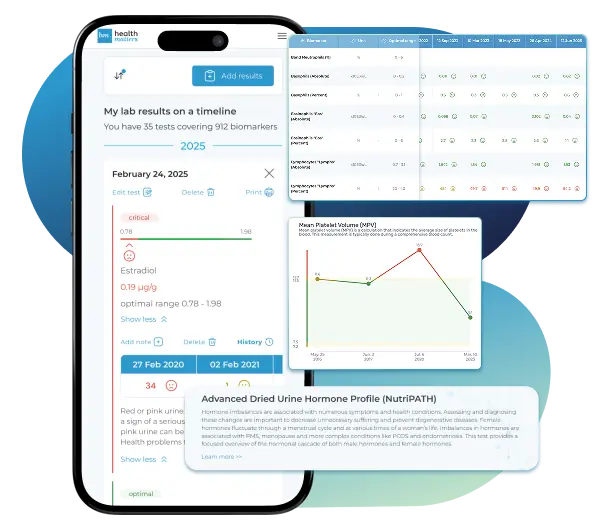
Import lab results from multiple providers, track changes over time, customize your reference ranges, and get clear explanations for each result. Everything is stored securely, exportable in one organized file, and shareable with your doctor—or anyone you choose.
Cancel or upgrade anytime
Article Review & Sources
All our content is backed by peer-reviewed studies, academic research, and trusted medical sources. We're committed to accuracy and transparency — see our editorial policy for details.
Laboratories
Bring All Your Lab Results Together — In One Place
We accept reports from any lab, so you can easily collect and organize all your health information in one secure spot.











Pricing Table
Gather Your Lab History — and Finally Make Sense of It
Finally, Your Lab Results Organized and Clear

Personal plans

$79/ year
Advanced Plan
Access your lab reports, explanations, and tracking tools.
- Import lab results from any provider
- Track all results with visual tools
- Customize your reference ranges
- Export your full lab history anytime
- Share results securely with anyone
- Receive 5 reports entered for you
- Cancel or upgrade anytime
$250/ once
Unlimited Account
Pay once, access everything—no monthly fees, no limits.
- Import lab results from any provider
- Track all results with visual tools
- Customize your reference ranges
- Export your full lab history anytime
- Share results securely with anyone
- Receive 10 reports entered for you
- No subscriptions. No extra fees.
$45/ month
Pro Monthly
Designed for professionals managing their clients' lab reports
- Import lab results from any provider
- Track lab results for multiple clients
- Customize reference ranges per client
- Export lab histories and reports
- Begin with first report entered by us
- Cancel or upgrade anytime
About membership
What's included in a Healthmatters membership
 Import Lab Results from Any Source
 See Your Health Timeline
 Understand What Your Results Mean

 Visualize Your Results

 Data Entry Service for Your Reports
 Securely Share With Anyone You Trust
Let Your Lab Results Tell the Full Story
Once your results are in one place, see the bigger picture — track trends over time, compare data side by side, export your full history, and share securely with anyone you trust.




Bring all your results together to compare, track progress, export your history, and share securely.
What Healthmatters Members Are Saying

I have been using Healthmatters.io since 2021. I travel all over the world and use different doctors and health facilities. This site has allowed me to consolidate all my various test results over 14 years in one place. And every doctor that I show this to has been impressed. Because with any health professional I talk to, I can pull up historical results in seconds. It is invaluable. Even going back to the same doctor, they usually do not have the historical results from their facility in a graph format. That has been very helpful.
Anthony
Unlimited Plan Member since 2021
What fantastic service and great, easy-to-follow layouts! I love your website; it makes it so helpful to see patterns in my health data. It's truly a pleasure to use. I only wish the NHS was as organized and quick as Healthmatters.io. You've set a new standard for health tracking!
Karin
Advanced Plan Member since 2020
As a PRO member and medical practitioner, Healthmatters.io has been an invaluable tool for tracking my clients' data. The layout is intuitive, making it easy to monitor trends and spot patterns over time. The ability to customize reports and charts helps me present information clearly to my clients, improving communication and outcomes. It's streamlined my workflow, saving me time and providing insights at a glance. Highly recommended for any practitioner looking for a comprehensive and user-friendly solution to track patient labs!
Paul
Healthmatters Pro Member since 2024

We implement proven measures to keep your data safe.
At HealthMatters, we're committed to maintaining the security and confidentiality of your personal information. We've put industry-leading security standards in place to help protect against the loss, misuse, or alteration of the information under our control. We use procedural, physical, and electronic security methods designed to prevent unauthorized people from getting access to this information. Our internal code of conduct adds additional privacy protection. All data is backed up multiple times a day and encrypted using SSL certificates. See our Privacy Policy for more details.