
D-Dimer, Quantitative
Other names: D-Dimer, Quant.
 Optimal Result:
0 - 500 ng/mL FEU,
or
0 - 0.5 ug/mL FEU.
Optimal Result:
0 - 500 ng/mL FEU,
or
0 - 0.5 ug/mL FEU.

Also Known As: Fragment D-dimer // Fibrin Degradation Fragment
Quick summary:
A D-dimer test is most often used to find out whether you have a blood clotting disorder. These disorders include:
- Deep vein thrombosis (DVT), a blood clot that's deep inside a vein. These clots usually affect the lower legs, but they can also happen in other parts of the body.
Symptoms of DVT include:
- Leg pain or tenderness
- Leg swelling
- Redness or red streaks on the legs
- Pulmonary embolism (PE), a blockage in an artery in the lungs. It usually happens when a blood clot in another part of the body breaks loose and travels to the lungs. DVT clots are a common cause of PE.
Symptoms of PE include:
- Trouble breathing
- Cough
- Chest pain
- Rapid heartbeat
- Disseminated intravascular coagulation (DIC), a condition that causes too many blood clots to form. They can form throughout the body, causing organ damage and other serious complications. DIC may be caused by traumatic injuries or certain types of infections or cancer.
- Stroke, a blockage in the blood supply to the brain.
---------------------------------------
What is D-Dimer?
D-Dimer is one of the protein fragments produced when a blood clot gets dissolved in the body. It is normally undetectable or detectable at a very low level unless the body is forming and breaking down blood clots. Then, its level in the blood can significantly rise. A D-dimer test is a blood test that can be used to help rule out the presence of a serious blood clot.
What is hemostasis and blood clots?
When a blood vessel or tissue is injured and begins to bleed, a process called hemostasis is initiated by the body to create a blood clot to limit and eventually stop the bleeding. This process produces threads of a protein called fibrin, which link together to form a fibrin net. That net, together with platelets, helps hold the forming blood clot in place at the site of the injury until it heals.
What is plasmin?
Once the area has had time to heal and the clot is no longer needed, the body uses an enzyme called plasmin to break the clot (thrombus) into small pieces so that it can be removed. The fragments of the disintegrating fibrin in the clot are called fibrin degradation products (FDP), which consist of variously sized pieces of crosslinked fibrin. One of the final fibrin degradation products produced is D-Dimer, which can be measured in a blood sample when present. Normally, with a little time, D-dimer goes away. But you can get high levels of D-dimer in your blood if you have a major clot like with deep vein thrombosis (DVT). With DVT, you have a clot deep in one of your veins, usually in your legs, and it can lead to serious problems.
When can D-Dimer levels rise?
The level of D-Dimer in the blood can significantly rise when there is significant formation and breakdown of fibrin clots in the body.
However, a positive D-Dimer test cannot predict whether or not a clot is present. It indicates that further diagnostic procedures are required (e.g., ultrasound, CT angiography).
Factors associated with inappropriate blood clot formation:
There are several factors and conditions associated with inappropriate blood clot formation. One of the most common is deep vein thrombosis (DVT), which involves clot formation in veins deep within the body, most frequently in the lower legs. These clots may grow very large and block blood flow in the legs, causing swelling, pain, and tissue damage. It is possible for a piece of the clot to break off and travel to other parts of the body. This "embolus" can lodge in the lungs, causing a pulmonary embolus or embolism (PE). Pulmonary embolisms from DVT affect more than 300,000 people in the U.S. each year.
Where do clots form and why test for D-Dimer?
While clots most commonly form in the veins of the legs, they may also form in other areas as well. Measurements of D-Dimer can be used to help detect clots in any of these sites. For example, clots in coronary arteries are the cause of myocardial infarction (heart attacks). Clots may form on the lining of the heart or its valves, particularly when the heart is beating irregularly (atrial fibrillation) or when the valves are damaged. Clots can also form in large arteries as a result of narrowing and damage from atherosclerosis. Pieces of such clots may break off and cause an embolus that blocks an artery in another organ, such as the brain (causing a stroke) or the kidneys.
Normal levels: If your results show low or normal D-dimer levels in the blood, it means you probably don't have a clotting disorder.
Lab Results Explained and Tracked
What does it mean if your D-Dimer, Quantitative result is too high?
If your results show higher than normal levels of D-Dimer, it may mean you have a clotting disorder. But it cannot show where the clot is located or what type of clotting disorder you have. Also, high D-Dimer levels are not always caused by clotting problems. Other conditions that can cause high D-Dimer levels include pregnancy, heart disease, and recent surgery. If your D-Dimer results were not normal, your provider will probably order more tests to make a diagnosis. This test can’t confirm that you have Deep vein thrombosis (DVT) or Pulmonary embolism (PE). It can only help rule them out.
Some of the other tests that your provider might order include:
- Doppler ultrasound, a test that uses sound waves to create images of your veins.
- CT angiography. In this test, you are injected with a special dye that helps your blood vessels show up on a special type of x-ray machine.
- Ventilation-perfusion (V/Q) scan. These are two tests that may be done separately or together. They both use small amounts of radioactive substances to help a scanning machine see how well air and blood move through your lungs.

All Your Lab Results.
One Simple Dashboard.
Import, Track, and Share Your Lab Results Easily
Import, Track, and Share Your Lab Results
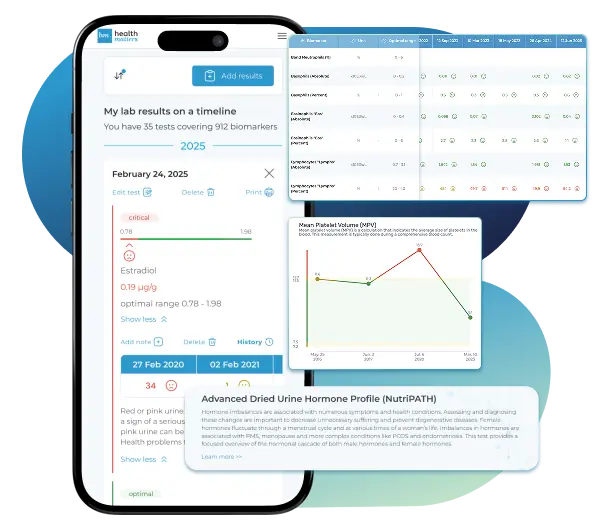
Import lab results from multiple providers, track changes over time, customize your reference ranges, and get clear explanations for each result. Everything is stored securely, exportable in one organized file, and shareable with your doctor—or anyone you choose.
Cancel or upgrade anytime
Article Review & Sources
All our content is backed by peer-reviewed studies, academic research, and trusted medical sources. We're committed to accuracy and transparency — see our editorial policy for details.
Laboratories
Bring All Your Lab Results Together — In One Place
We accept reports from any lab, so you can easily collect and organize all your health information in one secure spot.










Pricing Table
Gather Your Lab History — and Finally Make Sense of It
Finally, Your Lab Results Organized and Clear

Personal plans

$79/ year
Advanced Plan
Access your lab reports, explanations, and tracking tools.
- Import lab results from any provider
- Track all results with visual tools
- Customize your reference ranges
- Export your full lab history anytime
- Share results securely with anyone
- Receive 5 reports entered for you
- Cancel or upgrade anytime
$250/ once
Unlimited Account
Pay once, access everything—no monthly fees, no limits.
- Import lab results from any provider
- Track all results with visual tools
- Customize your reference ranges
- Export your full lab history anytime
- Share results securely with anyone
- Receive 10 reports entered for you
- No subscriptions. No extra fees.
$45/ month
Pro Monthly
Designed for professionals managing their clients' lab reports
- Import lab results from any provider
- Track lab results for multiple clients
- Customize reference ranges per client
- Export lab histories and reports
- Begin with first report entered by us
- Cancel or upgrade anytime
About membership
What's included in a Healthmatters membership
 Import Lab Results from Any Source
 See Your Health Timeline
 Understand What Your Results Mean

 Visualize Your Results

 Data Entry Service for Your Reports
 Securely Share With Anyone You Trust
Let Your Lab Results Tell the Full Story
Once your results are in one place, see the bigger picture — track trends over time, compare data side by side, export your full history, and share securely with anyone you trust.




Bring all your results together to compare, track progress, export your history, and share securely.
What Healthmatters Members Are Saying

I have been using Healthmatters.io since 2021. I travel all over the world and use different doctors and health facilities. This site has allowed me to consolidate all my various test results over 14 years in one place. And every doctor that I show this to has been impressed. Because with any health professional I talk to, I can pull up historical results in seconds. It is invaluable. Even going back to the same doctor, they usually do not have the historical results from their facility in a graph format. That has been very helpful.
Anthony
Unlimited Plan Member since 2021
What fantastic service and great, easy-to-follow layouts! I love your website; it makes it so helpful to see patterns in my health data. It's truly a pleasure to use. I only wish the NHS was as organized and quick as Healthmatters.io. You've set a new standard for health tracking!
Karin
Advanced Plan Member since 2020
As a PRO member and medical practitioner, Healthmatters.io has been an invaluable tool for tracking my clients' data. The layout is intuitive, making it easy to monitor trends and spot patterns over time. The ability to customize reports and charts helps me present information clearly to my clients, improving communication and outcomes. It's streamlined my workflow, saving me time and providing insights at a glance. Highly recommended for any practitioner looking for a comprehensive and user-friendly solution to track patient labs!
Paul
Healthmatters Pro Member since 2024

We implement proven measures to keep your data safe.
At HealthMatters, we're committed to maintaining the security and confidentiality of your personal information. We've put industry-leading security standards in place to help protect against the loss, misuse, or alteration of the information under our control. We use procedural, physical, and electronic security methods designed to prevent unauthorized people from getting access to this information. Our internal code of conduct adds additional privacy protection. All data is backed up multiple times a day and encrypted using SSL certificates. See our Privacy Policy for more details.